Guest viewing is limited
- You have a limited number of page views remaining
- 5 guest views remaining
- Register now to remove this limitation
- Already a member? Click here to login
GR User Forum
You are using an out of date browser. It may not display this or other websites correctly.
You should upgrade or use an alternative browser.
You should upgrade or use an alternative browser.
A new firmware for GR Digital IV
- Thread starter Roni G
- Start date

thelps
Active Member
- Joined
- Nov 5, 2007
- Messages
- 3,614
Its just been posted in the usual place -- http://www.ricoh.com/r_dc/download/firmware/grd4/
The revisions are here -- http://www.ricoh.com/r_dc/download/firmware/grd4/#02
The revisions are here -- http://www.ricoh.com/r_dc/download/firmware/grd4/#02


Blow-in
Active Member
- Joined
- Nov 18, 2011
- Messages
- 1,757
Re: AW: A new firmware for GR Digital IV
OK - I've just installed 2.21 and can answer your question. Previously the Snap Focus distance was not a function that could be assigned to Function Pairing (see page 119 of your original handbook) - now it can be assigned. So for example you could pair AF/Snap on Fn1 with SnapFocusDistance on Fn2.
Anyway, having decided to use my PX all week for a change, I'm now going to have to try out these new features - especially the auto DRC.
Richard
planet360":1m198b0s said:I don't understand the last improvment in the pdf; SnapFocusDist. can be registered...
OK - I've just installed 2.21 and can answer your question. Previously the Snap Focus distance was not a function that could be assigned to Function Pairing (see page 119 of your original handbook) - now it can be assigned. So for example you could pair AF/Snap on Fn1 with SnapFocusDistance on Fn2.
Anyway, having decided to use my PX all week for a change, I'm now going to have to try out these new features - especially the auto DRC.
Richard
Blow-in
Active Member
- Joined
- Nov 18, 2011
- Messages
- 1,757
vic225":32jva2i3 said:the auto DR locks the camera to auto iso
Yes when you select AUTO DRC the camera selects auto-hi ISO but whatever auto-hi limit you have set will apply (in my case I have it set to ISO 800). If you have saved a DRC setting in a 'MY' the camera still reverts to that setting when you power down & up again (or select a different 'MY'). I'm keen to see how effective AUTO DRC is - roll on daylight!
Richard
thelps
Active Member
- Joined
- Nov 5, 2007
- Messages
- 3,614
Blow-in":2y5acpc5 said:but whatever auto-hi limit you have set will apply (in my case I have it set to ISO 800)
Richard
So you can kind of "trick" it or at least control the ISO situation.
Blow-in
Active Member
- Joined
- Nov 18, 2011
- Messages
- 1,757
Re: AW: A new firmware for GR Digital IV
I was reading the various firmware updates last night in bed (!) and realised that the SnapFocusDistance assignment had appeared in an earlier release (I felt sure that I'd used it already!). The PDF gives the cumulative/total of all the updates and the latest release has added DRC AUTO, improved NR and the Target Zoom Play option.
Richard
Blow-in":2oktdsej said:planet360":2oktdsej said:I don't understand the last improvment in the pdf; SnapFocusDist. can be registered...
OK - I've just installed 2.21 and can answer your question. Previously the Snap Focus distance was not a function that could be assigned to Function Pairing (see page 119 of your original handbook) - now it can be assigned. So for example you could pair AF/Snap on Fn1 with SnapFocusDistance on Fn2.
Anyway, having decided to use my PX all week for a change, I'm now going to have to try out these new features - especially the auto DRC.
Richard
I was reading the various firmware updates last night in bed (!) and realised that the SnapFocusDistance assignment had appeared in an earlier release (I felt sure that I'd used it already!). The PDF gives the cumulative/total of all the updates and the latest release has added DRC AUTO, improved NR and the Target Zoom Play option.
Richard
Blow-in
Active Member
- Joined
- Nov 18, 2011
- Messages
- 1,757
thelps":2qvtol2c said:Blow-in":2qvtol2c said:but whatever auto-hi limit you have set will apply (in my case I have it set to ISO 800)
Richard
So you can kind of "trick" it or at least control the ISO situation.
Yes, when you select DRC AUTO the camera changes to ISO Setting Auto-Hi and you can see this both on the shooting screen and on page 3/3 in the shooting menu. You also see DR-AT on the shooting screen.
In the set-up menu on page 1/4 you have the option to set or limit the ISO Auto-hi settings - I've now set mine to 400, 1/30th and saved all of this to MY3. Using the Adj lever to select ISO, it also shows Auto-hi with no other options. However, the camera is still using a lower ISO when light permits. The other thing about DRC (not new) is that it is designed to work with the Exposure Metering set to Muti (shows as 'pattern' in the EXIF).
Now to try it!
Richard

HawkeyX
New Member
- Joined
- Mar 2, 2012
- Messages
- 91
done.
A shame this bug was not addressed:
http://www.ricohforum.com/viewtopic.php?f=66&t=8579
not that I have had it happen to me aside from testing.
I expect this will be the last update for the IV yes?
A shame this bug was not addressed:
http://www.ricohforum.com/viewtopic.php?f=66&t=8579
not that I have had it happen to me aside from testing.
I expect this will be the last update for the IV yes?
HawkeyX":1sy1h8pb said:done.
A shame this bug was not addressed:
http://www.ricohforum.com/viewtopic.php?f=66&t=8579
not that I have had it happen to me aside from testing.
I expect this will be the last update for the IV yes?
my bug!!!


odklizec
PK
- Joined
- Aug 11, 2007
- Messages
- 6,036
Only if Ricoh decided to change the GRD FW update schemeHawkeyX":fcrr6397 said:done.
I expect this will be the last update for the IV yes?
 Each GRD in the past got 5 feature enhancing firmwares (and a number of small bug fix FWs), where the last FW has been issued along with the new GRD. Last FW usually brings some features from the new GRD. Strangely, GRDIV got so far only one true feature enhancing FW and there was almost a year long silence with no new FW update. Not even the bug fixes! So who knows? There is nothing certain and they may very well release new GRD sooner than expected? We will see
Blow-in
Active Member
- Joined
- Nov 18, 2011
- Messages
- 1,757
Here are some preliminary shots to try out the new DRC AUTO setting.
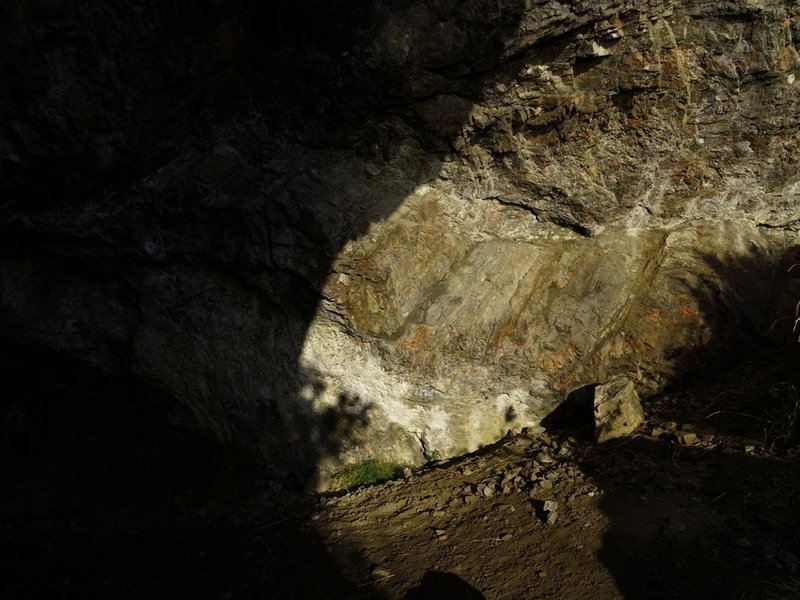
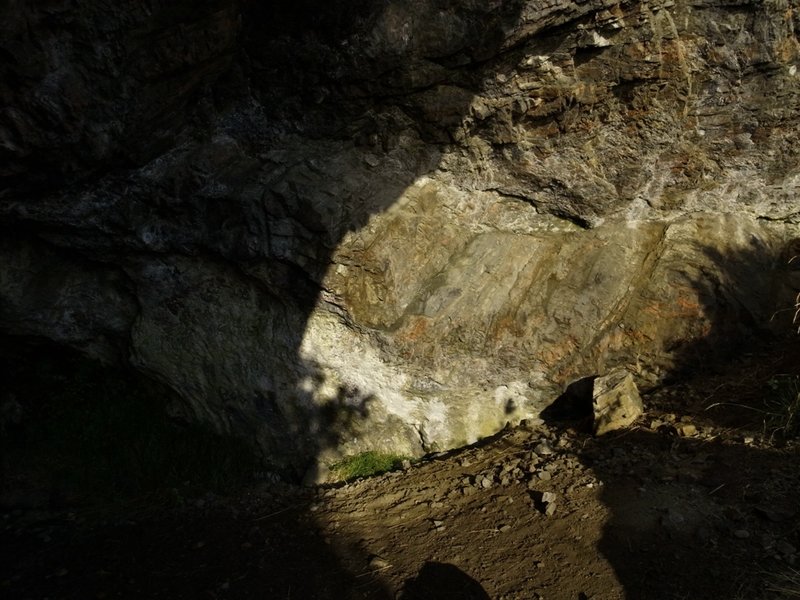
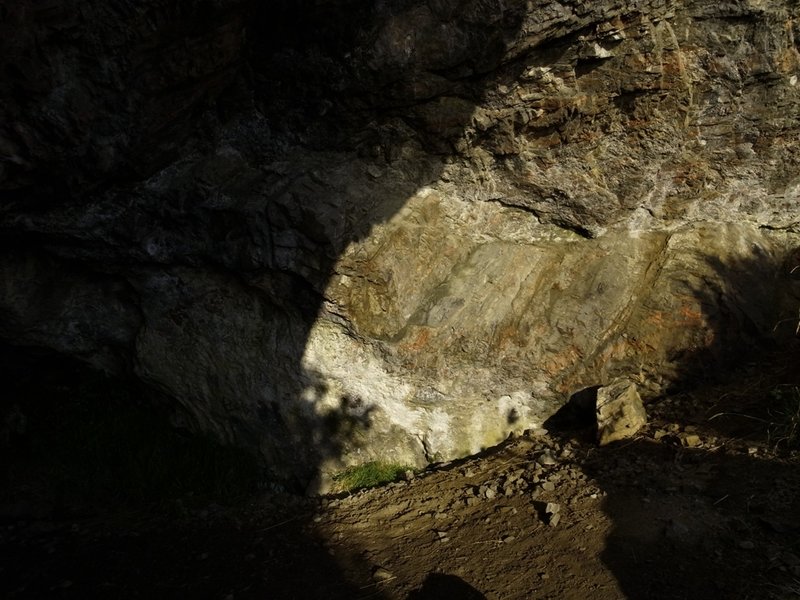
The first set are taken at the entrance of a cave with strong sun light directly on a rock with an area to the left in heavy shadow. Apart from changing the DRC setting, I left everything else the same for each shot (auto high ISO set to 400 1/30th, metering pattern etc)
So this is DRC off:
This is DRC weak:
DRC medium:
DRC strong:
And finally for this set, the new DRC AUTO:
Standing in the mouth of the cave and looking in to the light I took these 2:
With DRC off:
And with the DRC AUTO:
I've quite liked DRC ever since I found it on the camera for those scenes with bright & dark light. I tend to adjust the EV for the highlights and let the DRC pull-out the detail in the shadow. DRC AUTO looks like a worthwhile addition to me and will be my default setting in the function pairing.
Comments please.
Richard
The first set are taken at the entrance of a cave with strong sun light directly on a rock with an area to the left in heavy shadow. Apart from changing the DRC setting, I left everything else the same for each shot (auto high ISO set to 400 1/30th, metering pattern etc)
So this is DRC off:
This is DRC weak:
DRC medium:
DRC strong:
And finally for this set, the new DRC AUTO:
Standing in the mouth of the cave and looking in to the light I took these 2:
With DRC off:
And with the DRC AUTO:
I've quite liked DRC ever since I found it on the camera for those scenes with bright & dark light. I tend to adjust the EV for the highlights and let the DRC pull-out the detail in the shadow. DRC AUTO looks like a worthwhile addition to me and will be my default setting in the function pairing.
Comments please.
Richard
Attachments
-
 In cave - DRC medium.JPG427.6 KB · Views: 614
 -
 In cave - DRC off.JPG406.3 KB · Views: 611
 -
 In cave - DRC strong.JPG425 KB · Views: 611
 -
 In cave - DRC weak.JPG418.9 KB · Views: 608
 -
 in cave DRC AUTO.JPG435.2 KB · Views: 611
 -
 Mollie DRC off.JPG383.9 KB · Views: 603
 -
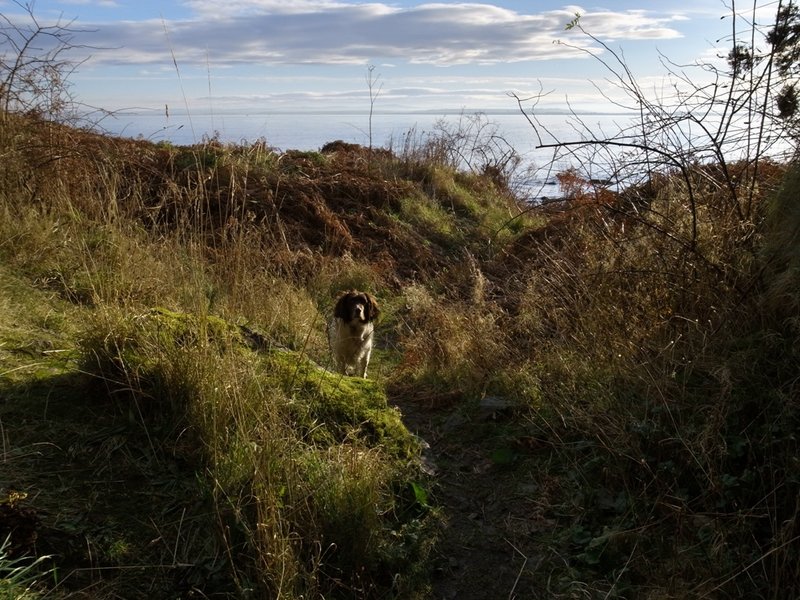 Mollie DRC AUTO.JPG402.2 KB · Views: 605
Blow-in
Active Member
- Joined
- Nov 18, 2011
- Messages
- 1,757
sergiozh":18c36d7q said:what does DRC mean please ? :?:
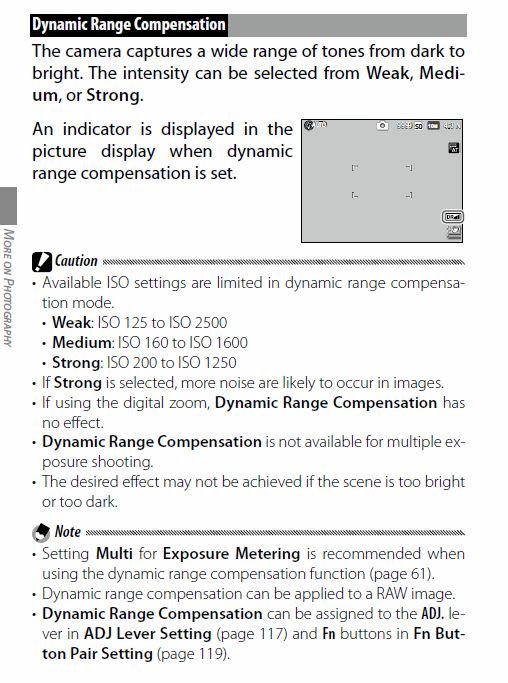
It's dynamic range compensation - it helps bring out the shadows while keeping the highlights (and works in RAW too) this is from page 72 of the handbook (the latest firmware has added AUTO to the settings):
Worth a try I suggest.
Richard